
Common SAT Mistakes and How to Fix Them
The most common digital SAT mistakes are misreads, answer traps, careless errors, and pacing. Here's how to catch each one, plus a 5-step review workflow.

Common SAT Mistakes and How to Fix Them
The most common SAT mistakes are misreading what the question asks, falling for answer traps, careless math or grammar errors, and poor pacing across modules. Fix them with a repeatable process: restate the question, prove your answer with evidence, use timing checkpoints, and review every miss by type so it doesn’t happen again.
Most SAT point losses come from repeat process mistakes, not just weak content. On the digital SAT, scores run from 400 to 1,600, so even a few missed questions from misreads, pacing, or sloppy review can chip away at your result.
If I had to boil this down, I’d focus on five fixes:
- Read the task first: watch for words like not, except, least, and most
- Answer the exact question: in Math, make sure I solved for what the prompt asks, like 2x instead of x
- Watch my pace: flag slow questions and come back later
- Review misses by cause: misread, concept gap, execution slip, timing issue, or strategy issue
- Practice in Bluebook: the digital SAT uses Bluebook, and tool fluency matters on test day[^1][^2]
Here’s the short version: if I keep missing the same type of question, the issue usually isn’t effort. It’s my system. A better review habit, cleaner pacing, and tighter question-reading can stop easy point loss before test day.
A few facts worth knowing:
- The SAT has two sections: Reading and Writing and Math
- Bluebook includes tools like question flagging and the built-in Desmos graphing calculator for Math[^1][^2]
- I should review wrong, guessed, and slow questions, not just wrong ones
Use the article as a fix-it guide: spot the pattern, name the cause, and write one rule to stop it next time.
[^1]: College Board, About Bluebook Tests
[^2]: College Board, Digital SAT Suite Student Guide
Misreading questions and dropping points you should have earned
Misreading a question can cost you points even when you know the material. Usually, it comes down to one small word. The question asks for the choice that is not supported by the passage, and you pick one that is. Or a Math item asks for 2x, but you stop after finding x. The work is right. The answer is still wrong.
| Mistake | Warning sign | Quick fix |
|---|---|---|
| Missed a key word in the question | The answer fits part of the prompt, not the whole task | Underline or restate words like "not", "except", "least", or "most" before you solve |
| Picked a familiar-sounding answer in Reading and Writing | The choice seems to fit but has no clear text support | Match the answer to exact evidence in the passage or sentence |
| Solved the wrong thing in Math | Your steps are right, but they answer the wrong variable or form | Check what the question asks for before you enter the final answer |
How to catch misreads before you answer
The simplest fix is to name the task before you start. Put the job into 2–3 words, like find percent increase, identify the unsupported claim, or solve for 2x, and jot it down [4]. That tiny pause can save an easy point.
In Math, it also helps to read the last line first. That keeps your eyes on the exact quantity the question wants, not just the first thing you can solve.
Once the task is clear, do one more check: does your answer actually do that job?
How to rule out answer traps using evidence
Clear wording helps, but it isn't enough. In Reading and Writing, the passage still has to back up the answer. Trap choices often reuse exact words from the text or sound polished enough to feel right [5].
Every correct answer must be traceable to the passage [3]. If you can't point to a specific sentence, don't lock it in yet. For example, a passage about a character "seeking his fortune" led many students to pick an answer about money as his motive. But the text only supported that he didn't have a clear plan. The familiar-looking choice lost because it stretched past what the passage actually said [5].
Use that same check every time: match the answer to what the prompt actually asks. Before you submit, make sure your answer fits the exact variable, unit, and form required [4][6].
Quick FAQ
What is the most common misread on the digital SAT?
Missing a small word like not, except, least, or most.
What should I do in Math before entering an answer?
Check that you solved for the exact value the question asks for, such as 2x instead of x [4][6].
How do I avoid trap answers in Reading and Writing?
Look for direct support in the passage. If you can't point to the line that backs the choice, keep checking [3][5].
Careless errors and pacing problems
A lot of missed digital SAT questions happen because of how you work through them, not because you never learned the topic.
How to cut careless execution errors and Reading and Writing errors
When you miss a question you were sure about, sort the miss into one of three buckets: misread, concept gap, or execution slip. Then use the answer explanation to name the exact mistake. That simple label helps turn a one-off miss into a pattern you can spot and fix.
For Math, pause before moving on and check signs, units, and final form. A small slip there can cost an otherwise correct answer. For Reading and Writing, write down the clue you missed and why the wrong choice seemed right. That matters because trap answers often look fine at first glance, especially when you're moving too fast.
Once you know the error type, you can work on the habit behind it instead of just reviewing the question and hoping it doesn't happen again.
How to manage time across digital SAT modules
Pacing matters on the digital SAT because extra time spent on one question can hurt you later in the module. In practice, flag slow questions, set a clear move-on point, and come back only if you still have time.
After each module, track the question types that slowed you down. Write down where your time went so your review stays pointed at the problems that cost you the most.
Example: If you keep spending too long on student-produced response Math questions or grammar questions with dense wording, that's not random. It's a pattern, and patterns are easier to fix than vague feelings about "bad timing."
FAQ
What counts as an execution slip?
An execution slip is a mistake in process, not knowledge. Think wrong sign, skipped word, bad arithmetic, or entering the answer in the wrong form.
Should I stay on a hard question until I solve it?
Not usually. On the digital SAT, it's often smarter to flag it, move on, and return later if time is left.
What should I track after practice?
Track misreads, concept gaps, execution slips, and the question types that slow you down most.
Weak review habits and gaps in digital SAT preparation
Once you know what kind of mistake you made, the next step is reviewing it the right way.
If you practice a lot but your score barely moves, you're probably reviewing scores instead of mistakes. A score tells you your level. It does not tell you why you missed questions. If you don't find the reason, the same errors tend to show up again.
The digital SAT also asks for fluency in Bluebook. If you haven't practiced inside the app, you can lose time on navigation, answer entry, and Desmos use. The College Board delivers the SAT digitally through Bluebook, and students should get used to the testing tools before test day.[1][2]
How to review mistakes so they do not repeat
The fix is simple: treat every missed, guessed, or slow question like a data point.
For each one, log these four things:
- Question type
- Root cause
- Correct reasoning
- Prevention rule you'll use next time
Root causes usually fall into five buckets: a content gap, a misread, an execution error, a timing problem, or a strategy error. Each one needs a different fix. A content gap calls for more study. A misread points to a reading habit problem. An execution error means you need cleaner work. A timing problem calls for pacing changes. A strategy error means your approach needs to change. Keep those buckets separate so you don't solve the wrong problem.
How to review SAT practice test mistakes
- Sort every miss by section and skill, such as Words in Context or Linear Equations.
- Label the cause: misread, trap, careless, content gap, or time.
- Re-solve the question without looking at the explanation, then compare.
- Write one rule you’ll use next time.
- Practice 5-10 questions in that same skill within a few days.
Practice by skill, including Reading and Writing trap questions and fixing careless algebra errors. Related post: How to Review SAT Wrong Answers After Practice.
How SAT Practice Bot supports targeted review
Targeted review works best when your practice shows patterns, not just scores.
Digital SAT readiness checklist
Before timed practice, make sure Bluebook actions feel automatic:
- Navigation: Can you move between questions fast without losing your place?
- Flagging: Do you know how to flag a question and return to it without breaking your rhythm?
- Answer submission: Are you clear on how answers are submitted so there are no last-minute surprises?
- Calculator fluency: Have you practiced with the built-in Desmos calculator or your approved handheld calculator so you're not learning it in the moment?
These are procedural skills, not content knowledge. If they still slow you down, they can turn into test-day mistakes.
Bluebook includes tools such as marking questions for review, moving through test questions, and using the built-in calculator on the math section.[1][2]
FAQ
Does reviewing only wrong answers work?
Not always. Review wrong, guessed, and slow questions. A lucky guess can hide a weak spot.
Should I practice in Bluebook before test day?
Yes. The College Board uses Bluebook for the digital SAT, so tool fluency matters.[1][2]
Is Desmos allowed on the digital SAT?
Yes. Bluebook includes a built-in graphing calculator for Math, and students may also use an approved handheld calculator.[1][2]
[1] College Board, About Bluebook Tests
[2] College Board, Digital SAT Suite Student Guide
Test-day mistakes and a simple error-reduction system
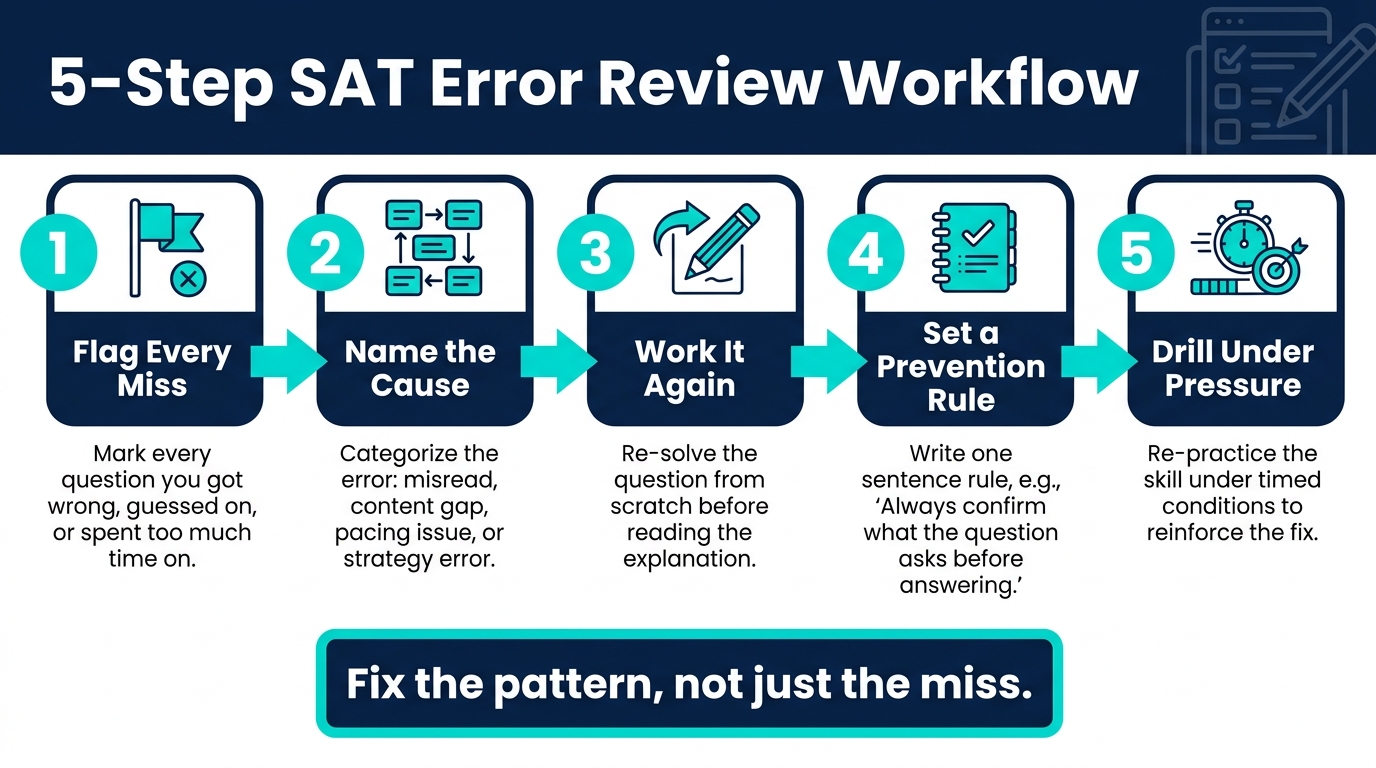
5-Step SAT Error Review System to Stop Repeating Mistakes
What to avoid on test day
Once your review system is set, bring that same discipline into the actual SAT.
Most test-day mistakes can be stopped. They usually come from the same problems you’ve already seen in practice: misreading the question, moving too slowly or too fast, and skipping steps in your process.
One common trap is carrying over paper SAT habits. Those habits can slow you down on the digital SAT. There’s also a more basic risk: if you forget a required item or bring something that isn’t allowed, you could be dismissed before you answer even one question.
| Allowed or required items | Prohibited or risky items |
|---|---|
| Admission ticket and acceptable photo ID if required by current rules | Unapproved electronic devices or restricted items |
| Approved calculator for math | Devices not explicitly permitted during testing |
Check the current rules, your test site, and your admission ticket before test day.
A 5-step workflow to stop repeating the same mistakes
After each practice test, use the same routine:
- Identify every question you got wrong, guessed on, or spent too much time on.
- Classify the cause: misread, content gap, pacing issue, or strategy error.
- Re-solve the question from scratch before reading the explanation.
- Write one prevention rule in a single sentence. For example: "Always confirm what the question is actually asking before selecting an answer."
- Re-practice the skill under time pressure.
The goal is to fix the pattern, not just one miss. If five questions went wrong for the same reason, that gives you a clear target. Review the cause, not just the score, and take the digital format as seriously as the content itself. On test day, both count.